標準出力を色づけするためのサンプルコード(Term::ANSIColor)
ターミナルに標準出力する文字列を(部分的に)色づけすると,結果がとても見易くなる。
今までそんなことが可能だと知らずに生きてきてしまったが,Term::ANSIColor モジュールというとても便利なモジュールがあることを知った。
- Sample Code 1: testColor.pl
#!/usr/bin/perl -w
use strict;
use Term::ANSIColor qw{colored};print colored('Hollo, World!', 'bold yellow') . "\n";
実行結果

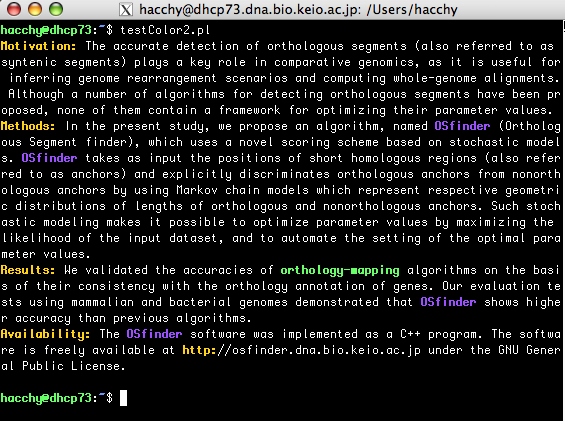
- Sample Code 2: testColor2.pl
#!/usr/bin/perl -w
use strict;
use Term::ANSIColor qw{colored};my $text = "Motivation: The accurate detection of orthologous segments (also referred to as syntenic segments) plays a key role in comparative genomics, as it is useful for inferring gen ..." # this is abstract of my previous paper.
# Set key phrases and associated colors.
my %keyPhrases = ('OSfinder' => 'bold magenta', 'orthology-mapping' => 'bold green');# Change mono-color text into colored text
foreach my $kp (keys %keyPhrases){
my $colored = colored( $kp, $keyPhrases{$kp} );
$text =~ s/$kp/$colored/g;
}# Set key regular expressions and associated colors.
my %keyExpressions = ('\w+:' => 'bold yellow', '\S+\@\S+' => 'bold cyan');
# Change mono-color text into colored text
foreach my $ke (keys %keyExpressions){
my %uniqueMatches;
while( $text =~ /($ke)/g ){
$uniqueMatches{$1} = 1;
}foreach my $match (keys %uniqueMatches){
my $colored = colored( $match, $keyExpressions{$ke} );
my $re = quotemeta( $match );
$text =~ s/$re/$colored/;
}
}# Print colored text
print $text . "\n";
実行結果